

| 일 | 월 | 화 | 수 | 목 | 금 | 토 |
|---|---|---|---|---|---|---|
| 1 | 2 | 3 | 4 | |||
| 5 | 6 | 7 | 8 | 9 | 10 | 11 |
| 12 | 13 | 14 | 15 | 16 | 17 | 18 |
| 19 | 20 | 21 | 22 | 23 | 24 | 25 |
| 26 | 27 | 28 | 29 | 30 |
- TensorFlow #Python #pip
- razer #deathadder #viper #g102
- 피코프레소 #ITOP40
- Java #MacBook #macOS
- ESP32 #Arduino
- Oh My Zsh #macOS
- VMware #Shared Folder
- Arduino #PlatformIO #macOS
- 매크로렌즈 #리버스링
- cycloidal #rv reducer
- x99 itx/ac
- fat32 #rufus
- VNC #Firewall #CenOS7 #VMware
- centos7 #yum update #/boot
- CM-EF-NEX
- Tarantula #3D 프린터
- XTU #Virtual Machine System
- VirtualBox #VMware
- Laptop #CPUID
- k6 #피코프레소
- Dell #Latitude #BIOS
- Arduino #Wall Plotter
- Linux #VirtualBox
- Xeon #E5-2680
- Octave #homebrew #macOS
- 다이슨 #배터리
- macro lens #EF #FD
- Callaway #Mavrik #Epic Flash
- egpu #aorus gaming box #gtx1070 #tb3
- ITOP40
- Today
- Total
얕고 넓게
[3DP] 네트워크 카메라 프로젝트 #1 본문
2025.12.29
TAPO 화질을 다시 보니 너무 않좋다.
더 비싼 카메라를 사기 전에 집에 있는 것들로 네트워크 카메라를 구성해서 테스트.
AI에게 여러 가지 물어 봤는데 답변은 별로
그냥 웹 검색 해달라고 해서...
RPi Zero 2 W + USB-카메라/센서
Raspberry Pi Zero 2W Camera Streaming FullHD (Update; June 2025) - wetransco.de
Raspberry Pi Zero 2W Camera Streaming FullHD (Update; June 2025) - wetransco.de
Raspberry Pi Zero 2W Camera Streaming FullHD (Update; June 2025) wetransco.de Uncategorised
www.wetransco.de
Raspberry Zero Cam With Webserver : 5 Steps - Instructables
Raspberry Zero Cam With Webserver
Raspberry Zero Cam With Webserver: This is a simple project to turn a Raspberry Zero 2 W with an attached camera (either the basic Pi Zero Cam or an infrared camera) into an internet accessible live web camera. In essence, it combines a Python script and F
www.instructables.com
Night vision camera module for Raspberry Pi
Night vision camera module for Raspberry Pi
Shop with confidence – we've been serving the hobbyist electronics, Maker, and retro gaming communities since 2012. Satisfaction or refund guarantee Worldwide shipping via mail or courier 57,000+ customer reviews Secure website and payments
shop.pimoroni.com
Complete Guide: Raspberry Pi Zero 2 W USB Webcam Setup - Raspberry Pi Forums
Complete Guide: Raspberry Pi Zero 2 W USB Webcam Setup - Raspberry Pi Forums
# Complete Guide: Raspberry Pi Zero 2 W USB Webcam Setup Transform your Raspberry Pi Zero 2 W into a plug-and-play USB webcam that works with Windows, Mac, and Linux. ## Hardware Requirements - **Raspberry Pi Zero 2 W** with camera connector - **IMX708 Cam
forums.raspberrypi.com
Plug-and-play Raspberry Pi USB webcam - Raspberry Pi
Plug-and-play Raspberry Pi USB webcam - Raspberry Pi
Webcams are generally low in quality and low in resolution, so we've made a tutorial to show you how to build your own high-quality Raspberry Pi webcam.
www.raspberrypi.com
RPi 4 용 센서는 커넥터가 안 맞는다.
소형 CSI 커넥터
당근 뒤지고 안되면 파츠파츠 아니면, 네이버 쇼핑으로
2026.01.01
이제 쿠팡대신 무조건 네이버 쇼핑으로
라즈베리파이5 카메라 케이블 제로 (22pin to 15pin) zero/w FFC 케이블 -15cm : 엘레파츠샵
[엘레파츠샵] 신뢰할 수 있는 전자부품 쇼핑몰, 엘레파츠 입니다.
smartstore.naver.com
연말이라 배송이 제일 바른 것중 저렴한 것으로.
약 천원 x 3개
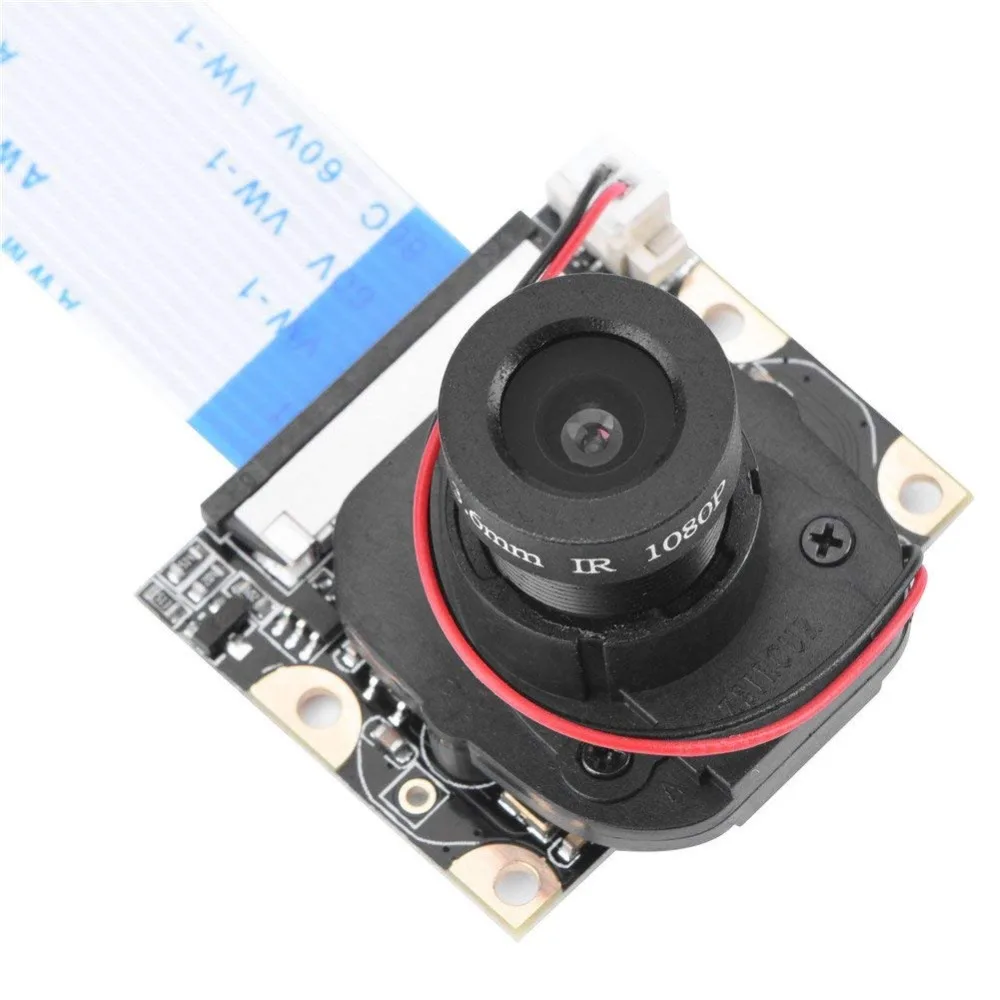
배송비 아까워 6천원 센서도 주문할 까 했는데 이미 가지고 있는 것이 있어서 포기
모델명 확인이 필요
내가 언제 이걸 샀지?

구글렌즈로 검색하면 여러 제품이 나오는데 적외선 센서? LED가 없는 것으로 봐서 이것 같다.
https://ko.aliexpress.com/item/32955334604.html
라즈베리 파이 카메라 모듈, 수동 ir-컷 야간 투시경 카메라 5mp 1080 p hd 웹캠, 라스베리 파이 2 모
Smarter Shopping, Better Living! Aliexpress.com
ko.aliexpress.com
2026.01.02
하루만에 케이블이 왔다
실제 연결하고 보니 처음 자료들이 다 안맞는다.
어떤것은 USB 카메라 이용, 센서 이용하는 것은 OTG로 PC와 연결하는 설정이다.
AI를 통해서 진행하다가 libcamera 를 설치해도 명령어가 안보인다.
lite os 대신 일반 32bit os로 SD 굽고 다시 실행
그래도 안되네 ㅠㅠ
https://fishpoint.tistory.com/7801
라즈베리파이3 B+ libcamera 설치
이전 라즈베리파이3 B+ libcamera 설치 문제 해결 포스팅에서 라즈베리파이4 전용 OS인 Bullseye 에서는 이미 libcamera 라이브러리가 들어 있다고 해서 설명 내용은 라즈베리파이4 이하 보드에 라즈베리
fishpoint.tistory.com
https://fishpoint.tistory.com/7809
라즈베리파이 카메라 모듈 V3 요약
교육용 싱글보드 컴퓨터로 유명한 영국 라즈베리 파이(Raspberry Pi)가 새로운 라즈베리 파이 카메라 모듈3(Camera Module3)을 출시했다. 플랫폼이 어떻게 발전하는 지를 보여주는 사이트가 아두이노와
fishpoint.tistory.com
sudo apt install libcamera-apps -y
이렇게 설치한뒤 libcamera 관련 (-hello, -liv) 등을 해봐도 못찾는다.
뭐하나 쉽게 되는게 없네.
맥에서 접속해서 해봐도 똑같다.
ChatGPT에서 다시 물어 봤는데 똑같은 대답만 하다가 로그를 보여주니 이름이 바뀌었다고 한다 ㅠㅠ
libcamera => rpicam
그다음은 스트링밍 설정
rtmp, rtsp는 서버가 필요해서 그냥 udp 브로드 캐스트
16  rpicam-vid -t 0 -o - | ffmpeg -f h264 -i - -c:v copy -f flv rtmp://localhost/live/stream
17  rpicam-vid -t 0 -o - | ffmpeg -i - -c:v copy -f rtsp rtsp://0.0.0.0:8554/live.stream
18  rpicam-vid -t 0 -o - | ffmpeg -i - -c:v copy -f mpegts udp://0.0.0.0:1234
19  rpicam-vid -t 0 -o - | ffmpeg -i - -c:v copy -f mpegts udp://192.168.219.173:1234
VLC에서 안열린다.
방화벽...
5000번으로 똑같다
rpicam-vid -t 0 --width 640 --height 480 --framerate 15 --inline --listen -o udp://0.0.0.0:1234똑같이 접속안됨
예전 ffmpeg 관련를 찾아봐야겠다.
'IT > 3D Printer, CNC' 카테고리의 다른 글
| [3DP] KP3S vs KP3S Pro (0) | 2026.01.25 |
|---|---|
| [3DP] 네트웍크 카메라 프로젝트 2 (0) | 2026.01.03 |
| [3DP] A1 hotend 고장 및 수리 (0) | 2025.12.27 |
| [3DP] BB 베어링 (0) | 2025.12.14 |
| [3DP] Creality DWIN LCD 사용 @Marlin, MKS Base (0) | 2025.12.11 |


