

Notice
Recent Posts
Recent Comments
Link
| 일 | 월 | 화 | 수 | 목 | 금 | 토 |
|---|---|---|---|---|---|---|
| 1 | 2 | 3 | 4 | |||
| 5 | 6 | 7 | 8 | 9 | 10 | 11 |
| 12 | 13 | 14 | 15 | 16 | 17 | 18 |
| 19 | 20 | 21 | 22 | 23 | 24 | 25 |
| 26 | 27 | 28 | 29 | 30 |
Tags
- Linux #VirtualBox
- ITOP40
- Callaway #Mavrik #Epic Flash
- macro lens #EF #FD
- XTU #Virtual Machine System
- k6 #피코프레소
- egpu #aorus gaming box #gtx1070 #tb3
- Dell #Latitude #BIOS
- Arduino #PlatformIO #macOS
- Java #MacBook #macOS
- x99 itx/ac
- Laptop #CPUID
- Xeon #E5-2680
- CM-EF-NEX
- fat32 #rufus
- Oh My Zsh #macOS
- VirtualBox #VMware
- centos7 #yum update #/boot
- Tarantula #3D 프린터
- VMware #Shared Folder
- 다이슨 #배터리
- Arduino #Wall Plotter
- ESP32 #Arduino
- 피코프레소 #ITOP40
- Octave #homebrew #macOS
- cycloidal #rv reducer
- razer #deathadder #viper #g102
- 매크로렌즈 #리버스링
- VNC #Firewall #CenOS7 #VMware
- TensorFlow #Python #pip
Archives
- Today
- Total
얕고 넓게
[3DP] Anycubic i3 Mega Display 본문
2025.12.04
종류
https://github.com/knutwurst/Marlin-2-0-x-Anycubic-i3-MEGA-S/wiki/Types-of-Anycubic-Touchscreens
Types of Anycubic Touchscreens
Marlin 2.0.x Version for Anycubic i3 MEGA M/S/P/X/CHIRON and 4MAX with Anycubic TFT or the "new" DGUS Clone TFT - Now also with BLTouch! - knutwurst/Marlin-2-0-x-Anycubic-i3-MEGA-S
github.com
i3 Mega/Mega S (Blue/White Interface)
i3 Mega TFT, based on the Nuvoton NCU120LC1 MCU
짧은 답변:
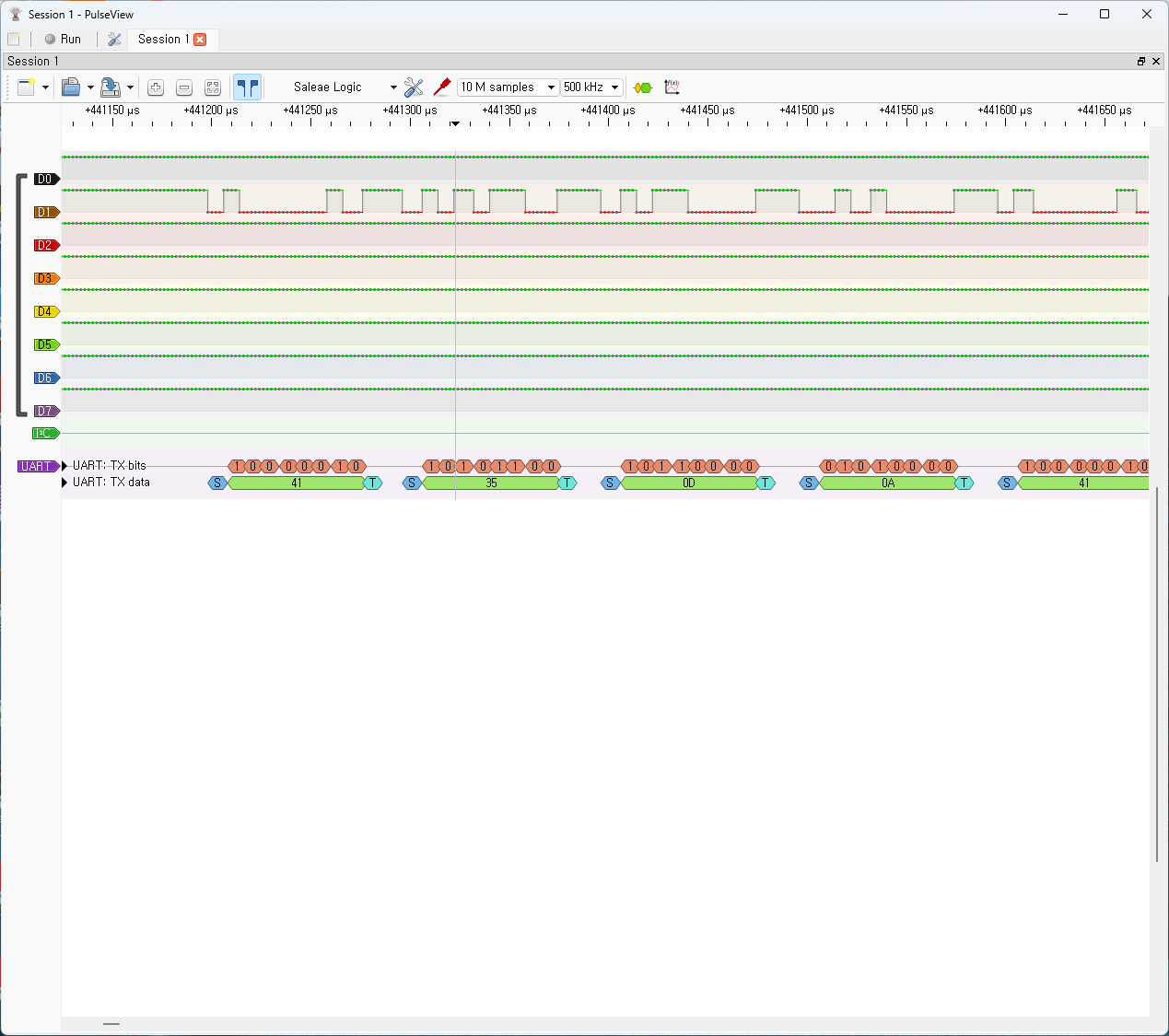
Anycubic i3 Mega의 터치 디스플레이는 TFT‑2560 시리얼 통신 프로토콜을 사용합니다. 즉, 메인보드(ATmega2560 기반)와 LCD 사이에서 **UART(시리얼)**을 통해 명령과 데이터를 교환하는 구조입니다.
📡 프로토콜 개요
- 통신 방식: UART 시리얼 (일반적으로 115200 baud)
- 명령 구조: ASCII 코드 기반으로, 각 명령은 문자열 + 종료문자(0x0D 0x0A, 즉 CRLF)로 이루어짐
- 예시:
- A5\r\n → 특정 화면 호출
- A6\r\n → 다른 화면 호출
- A7\r\n → 또 다른 화면 호출
- LCD 역할: 단순히 그래픽 UI를 표시하고, 버튼 입력을 시리얼로 메인보드에 전달
- 메인보드 역할: Marlin 펌웨어(혹은 커스텀 펌웨어)가 LCD 명령을 해석하고 프린터 동작을 제어
🔑 특징
- 독자적인 명령 매핑: Anycubic이 정의한 전용 코드 테이블이 있으며, GitHub에 공개된 매핑 문서(TFT‑2560CommunicationProtocol.xlsx)에서 확인 가능.
- 호환성 문제: 일반 Marlin LCD와 달리 표준 G‑code LCD 프로토콜을 쓰지 않기 때문에, 커스텀 펌웨어(Marlin‑Ai3M 등)에서 별도 지원이 필요.
- 확장성: 이 프로토콜을 해석하면, 외부 장치나 PC에서 직접 LCD 명령을 보내 프린터를 제어할 수도 있음.
🛠️ 참고 자료
👉 정리하면, Anycubic i3 Mega의 디스플레이는 **일반적인 G‑code LCD 프로토콜이 아닌, Anycubic 전용 시리얼 명령 프로토콜(TFT‑2560)**을 사용합니다.
혹시 원하시면 제가 실제 명령어 테이블을 정리해서 보여드릴 수도 있는데, 그 부분도 확인해드릴까요?
| Command Description | TFT command format | Command mode | Transmitting the motherboard (or return) format | |
| Get extrusion head temperature | A0 (command behind all should have a carriage return character) | → | A0V 123 (A0 to command 123 to a temperature value) \ r \ n | |
| Obtaining a target temperature extrusion | A1 | → | A1V 123 | |
| Get hot bed temperature | A2 | → | A2V 123 | |
| Get hot bed target temperature | A3 | → | A3V 120 | |
| Get the fan speed | A4 | → | A4V 100 | |
| Get the current coordinates | A5 | → | A5V X12.1Y200.2Z150.3E123.0 | |
| SD card acquiring print progress | A6 | → | A6V 100 | |
| Get the printing time | A7 | → | A7V48 hours 59 minutes | |
| Get print list | A8 | → | 例如: TEST ~ 1.GCO | The function to be perfect |
| The memory card is inserted | ← | J00 | ||
| The memory card is removed | ← | J01 | ||
| No memory card | ← | J02 | ||
| Online printing ... | ← | J03 | ||
| Offline printing ... | ← | J04 | ||
| Print pause ... | ← | J05 | ||
| The nozzle is heated | ← | J06 | ||
| Complete nozzle heating | ← | J07 | ||
| Hot bed is heated | ← | J08 | ||
| Heating hot bed complete | ← | J09 | ||
| T0 sensor error | ← | J10 | ||
| It has an emergency stop | ← | J11 | ||
| Ready | ← | J12 | ||
| The extrusion temperature is too low | ← | J13 | ||
| Print complete | ← | J14 | ||
| Inadequate supplies | ← | J15 | ||
| Reset the board | → | |||
| Pause Print | A9 | → | Dealing OK | |
| Resume printing | A10 | → | OK | |
| Stop printing | A11 | → | OK | |
| emergency stop | A12 | → | OK | |
| Command Description | TFT command format | Command mode | Transmitting the motherboard (or return) format | |
| Select a document | A13 test ~ 1.gco (file name must be lowercase) | → | J21 open failed J20 Open success |
The function to be perfect |
| Reprint | A14 | → | OK | |
| Resume play | A15 | → | OK | |
| Refresh list | A26 | → | OK (have cards) J2OK (no card) | |
| Command Description | TFT command format examples | Command mode | Transmitting the motherboard (or return) format | |
| Extrusion temperature was set | A16 S123 (maximum 275) | → | OK | |
| Bed temperature setting hot | A17 S150 (maximum 150) | → | OK | |
| Fan speed setting | A18 S255 (maximum 255) | → | OK | |
| Close motor drive | A19 | → | OK | |
| Print speed setting | A20 S999 (10 ~ 999) | → | OK | |
| Steering angle setting | A27 R32 F133 / A27 O (acknowledgment) | → | OK | After the prompt entry into force of the machine reset |
| Supplies detection switch | An A28 / A28 C | → | OK | |
| Z offset limit switch (not used) | A29 S-22.5 | → | OK | After the prompt entry into force of the machine reset |
| Auxiliary leveling | A30 | → | OK | |
| Z-offset servo switch | A31 D4.8 | → | OK | |
| Command Description | TFT command format examples | Command mode | Transmitting the motherboard (or return) format | |
| Machine zero | A21 | → | OK | |
| Zero X axis | A21 X | → | OK | |
| Y axis zeroing | A21 Y | → | OK | |
| Zero Z-axis | From the A21 | → | OK | |
| 移动 轴 ± 0.1 / 1 / 10mm | A22 X (or Y or Z) ± 0.1 / 1 / 10F1000 (F as velocity) | → | OK | |
| Extrusion | A22 E ± 0.1 / 1 / 10F1000 (F as velocity) | → | OK | |
| 预热 PLAN | A23 S200 B60 | → | OK | |
| Preheat ABS | A24 S240 B80 | → | OK | |
| Lower the temperature | A25 | → | OK | |
'IT > 3D Printer, CNC' 카테고리의 다른 글
| [3DP] Creality DWIN LCD 사용 @Marlin, MKS Base (0) | 2025.12.11 |
|---|---|
| [3DP] Anycubic i3 Mega 정리 (0) | 2025.12.04 |
| [3DP] XY Plotter 진짜 최종본? (0) | 2025.11.24 |
| [3DP] XY Plotter 최종본 (아마도) (0) | 2025.11.23 |
| [3DP] Marlin Servo 제어 @MKS Base (0) | 2025.11.21 |
'IT/3D Printer, CNC' Related Articles
more


