

| 일 | 월 | 화 | 수 | 목 | 금 | 토 |
|---|---|---|---|---|---|---|
| 1 | 2 | 3 | 4 | |||
| 5 | 6 | 7 | 8 | 9 | 10 | 11 |
| 12 | 13 | 14 | 15 | 16 | 17 | 18 |
| 19 | 20 | 21 | 22 | 23 | 24 | 25 |
| 26 | 27 | 28 | 29 | 30 |
- Tarantula #3D 프린터
- egpu #aorus gaming box #gtx1070 #tb3
- macro lens #EF #FD
- 다이슨 #배터리
- x99 itx/ac
- ITOP40
- XTU #Virtual Machine System
- 매크로렌즈 #리버스링
- centos7 #yum update #/boot
- VirtualBox #VMware
- CM-EF-NEX
- Arduino #PlatformIO #macOS
- fat32 #rufus
- Octave #homebrew #macOS
- Laptop #CPUID
- TensorFlow #Python #pip
- razer #deathadder #viper #g102
- 피코프레소 #ITOP40
- ESP32 #Arduino
- cycloidal #rv reducer
- k6 #피코프레소
- Oh My Zsh #macOS
- Dell #Latitude #BIOS
- VNC #Firewall #CenOS7 #VMware
- Xeon #E5-2680
- VMware #Shared Folder
- Java #MacBook #macOS
- Arduino #Wall Plotter
- Callaway #Mavrik #Epic Flash
- Linux #VirtualBox
- Today
- Total
얕고 넓게
[PC] 해킨토시: 설치 본문
2026.04.01
중간 중간 정리하려고 했는데 이해도 안되고 해서 일단 도적해보고 결과를 정리
https://dortania.github.io/OpenCore-Install-Guide/installer-guide/
Creating the USB | OpenCore Install Guide
Creating the USB Requirements: OpenCorePkg (opens new window), highly recommend running the debug version to show more info ProperTree (opens new window) to edit .plist files (OpenCore Configurator is another tool but is heavily outdated and the Mackie ver
dortania.github.io
- macOS 설치 USB 만들기
- Windows 설치 USB 와 비슷한 개념
- 차이점은 OpenCore라는 부트 메니저를 설정하고 추가해야 함
- 순정 macOS 시동 USB 제작
- 맥북에서 sequoia 다운로드
- USB 메모리 초기화
- OS 설치
- OpenCore 설치
- OpenCore 다운로드
- EFI 디렉토리 복사
- 필요한 파일들 정리
- ProperTree
- config.plist를 정리해주는 툴
- ProperTree 다운로드
- python3 ~.py 실행
- plist 파일 선택
- 여러가지 설정 후 저장
- BIOS 설정
- CSM: X
- VT-d: X
- SATA: IDE -> AHCI
- Secure Boot: X
- Fast Boot: X
macOS 설치 USB 만든 후 OpenCore EFI 디렉토리 복사후 부팅해봤는데 검은색 화면에 커서만 깜빡인다.
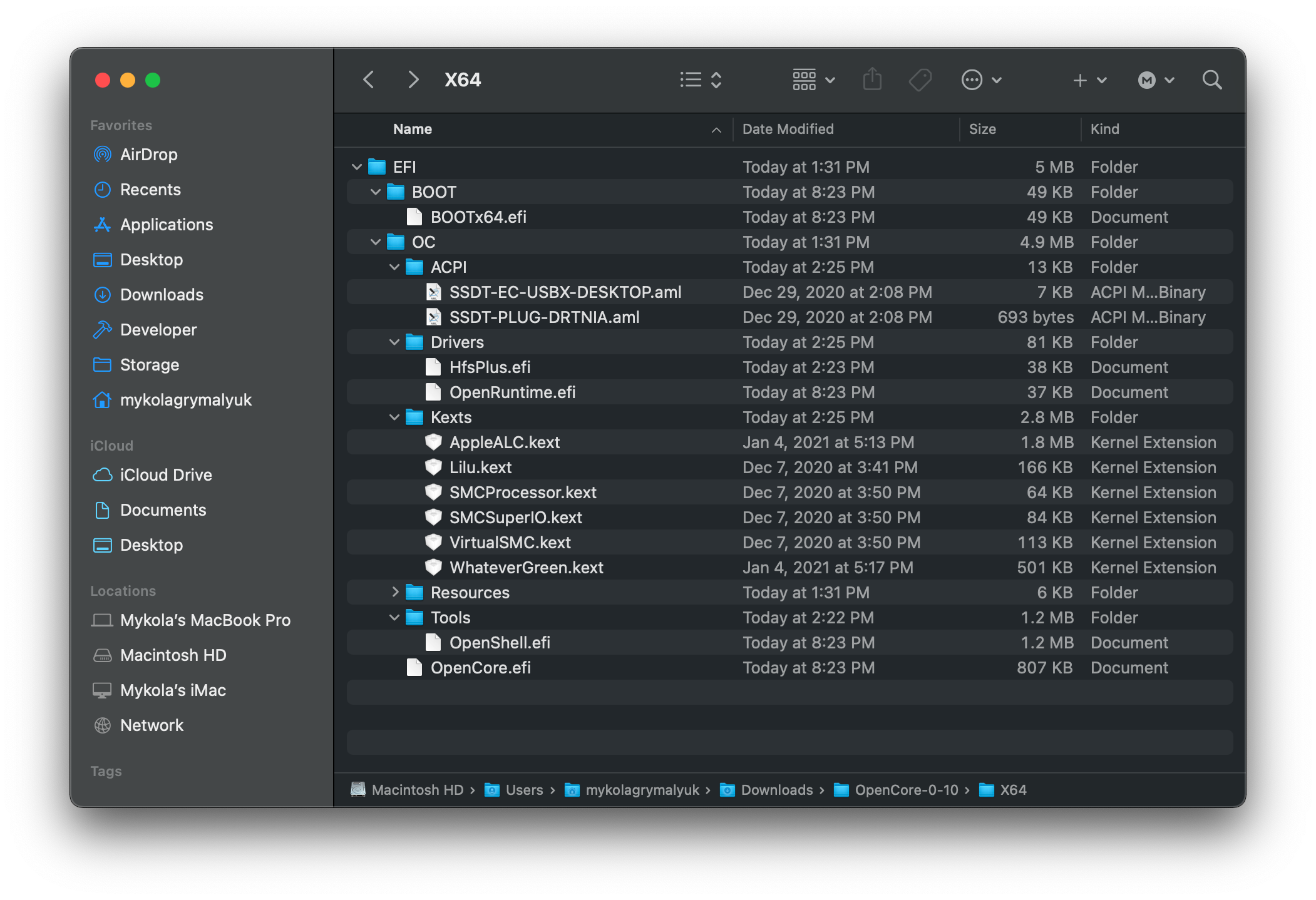
대충 위의 느낌대로 만들었다
ChatGPT의 도움으로 E5-2697V4, X99, RX5700XT 조합에 대한 설정 진행
Driver
OpenRuntime.efi
HfsPlus.efi
OpenCanopy.efi (선택)
KEXTS
Lilu.kext
VirtualSMC.kext
WhateverGreen.kext
AppleALC.kext (사운드용)
IntelMausi.kext (LAN)
USBInjectAll.kext (초기용)
Boot->Quirks
AvoidRuntimeDefrag = YES
DevirtualiseMmio = YES
EnableSafeModeSlide = YES
EnableWriteUnprotector = YES
ProtectUefiServices = YES
ProvideCustomSlide = YES
RebuildAppleMemoryMap = YES
SetupVirtualMap = YES
SyncRuntimePermissions = YES
Kernel -> Quirks
AppleCpuPmCfgLock = YES
AppleXcpmCfgLock = YES
DisableIoMapper = YES
PanicNoKextDump = YES
PowerTimeoutKernelPanic = YES
XhciPortLimit = YES (설치용)
NVRAM -> boot-args
-v keepsyms=1 debug=0x100 npci=0x2000
agdpmod=pikera
PlatformInfo
SMBIOS -> iMacPro1,1
그래도 안되서 BIOS 확인 -> CSM 끔
USB 메모리가 부팅 순서에 안나옴
diskutil list 로 확인해서 보니 MBR로 되어 있어 문제라고 함.
설치 디스크 만들때 macOS 저널링으로 했는데 이것은 포맷이고 MBR, GPT에서 GPT로 되어야 한다고 함
맥북의 SSD도 보니 GUID_... 로 되어 있다.
➜  ProperTree-master diskutil list
/dev/disk0 (internal, physical):
   #:                       TYPE NAME                    SIZE       IDENTIFIER
   0:      GUID_partition_scheme                        *251.0 GB   disk0
   1:             Apple_APFS_ISC Container disk1         524.3 MB   disk0s1
   2:                 Apple_APFS Container disk3         245.1 GB   disk0s2
   3:        Apple_APFS_Recovery Container disk2         5.4 GB     disk0s3

...

/dev/disk4 (external, physical):
   #:                       TYPE NAME                    SIZE       IDENTIFIER
   0:     FDisk_partition_scheme                        *128.2 GB   disk4
   1:                  Apple_HFS InstallUSB              128.2 GB   disk4s1
지우고 다시 설치
diskutil eraseDisk GPT FAT32 InstallUSB /dev/disk4초기화 오류. GPT가 잘못 알려줬다. 다시 EFI 디렉토리가 생긴다?
 diskutil eraseDisk JHFS+ InstallUSB GPT /dev/disk4
 diskutil list
 /dev/disk4 (external, physical):
   #:                       TYPE NAME                    SIZE       IDENTIFIER
   0:      GUID_partition_scheme                        *128.2 GB   disk4
   1:                        EFI EFI                     209.7 MB   disk4s1
   2:                  Apple_HFS InstallUSB              127.8 GB   disk4s2
EFI 파티션에 EFI 디렉토리 내용 복사하라고 함
/EFI - EFI - OC <- 이거 잘못
EFI 파티션은 파인더에서 안보이니 마운트 후 사용
sudo diskutil mount disk4s1파일 복사는 터미널에서 하면 readonly 로 제약이 걸려서 파인더에서 직접 복사
이제는 되었다 싶어 부팅했는데 그냥 윈도우로 넘어간다.
아! macOS가 없구나 ㅠㅠ
다시 macOS 설치
sudo /Applications/Install\ macOS\ Sequoia.app/Contents/Resources/createinstallmedia --volume /Volumes/InstallUSB
여러 삽질 끝에 EFI volume 아래 EFI 디렉토리가 있어야 함
부팅하면
"OC: configure requires valute but no valute provieded" 나오고 반응 없음
ChatGPT도 이제는 앵무새가 되어버렸다.
다시 처음 부터 천천히
https://dortania.github.io/OpenCore-Install-Guide/config-HEDT/broadwell-e.html#intel-bios-settings
Broadwell-E | OpenCore Install Guide
Broadwell-E Support Version Initial macOS Support OS X 10.11, El Capitan Starting Point So making a config.plist may seem hard, it's not. It just takes some time but this guide will tell you how to configure everything, you won't be left in the cold. This
dortania.github.io
'IT > PC' 카테고리의 다른 글
| [PC] 해킨토시: 설치 재재도전 (0) | 2026.04.02 |
|---|---|
| [PC] 해킨토시: 설치 재도전 (0) | 2026.04.02 |
| [PC] Windows 인증 정보 확인 (0) | 2026.03.31 |
| [PC] 3DMARK: 23475, 9268 @RX5700XT, 3700X (0) | 2026.03.31 |
| [PC] 랩탑, SSD 정리 (0) | 2026.03.30 |


