

Notice
Recent Posts
Recent Comments
Link
| 일 | 월 | 화 | 수 | 목 | 금 | 토 |
|---|---|---|---|---|---|---|
| 1 | 2 | 3 | 4 | 5 | 6 | |
| 7 | 8 | 9 | 10 | 11 | 12 | 13 |
| 14 | 15 | 16 | 17 | 18 | 19 | 20 |
| 21 | 22 | 23 | 24 | 25 | 26 | 27 |
| 28 | 29 | 30 |
Tags
- centos7 #yum update #/boot
- egpu #aorus gaming box #gtx1070 #tb3
- Linux #VirtualBox
- 다이슨 #배터리
- fat32 #rufus
- ESP32 #Arduino
- Java #MacBook #macOS
- VNC #Firewall #CenOS7 #VMware
- Octave #homebrew #macOS
- Arduino #Wall Plotter
- k6 #피코프레소
- VirtualBox #VMware
- Arduino #PlatformIO #macOS
- TensorFlow #Python #pip
- Xeon #E5-2680
- x99 itx/ac
- macro lens #EF #FD
- razer #deathadder #viper #g102
- XTU #Virtual Machine System
- Dell #Latitude #BIOS
- Laptop #CPUID
- Callaway #Mavrik #Epic Flash
- ITOP40
- 매크로렌즈 #리버스링
- 피코프레소 #ITOP40
- Oh My Zsh #macOS
- VMware #Shared Folder
- cycloidal #rv reducer
- CM-EF-NEX
- Tarantula #3D 프린터
Archives
- Today
- Total
얕고 넓게
[AI] LLamaFactory 설치 및 FT 성공 정리 본문
2026.03.01
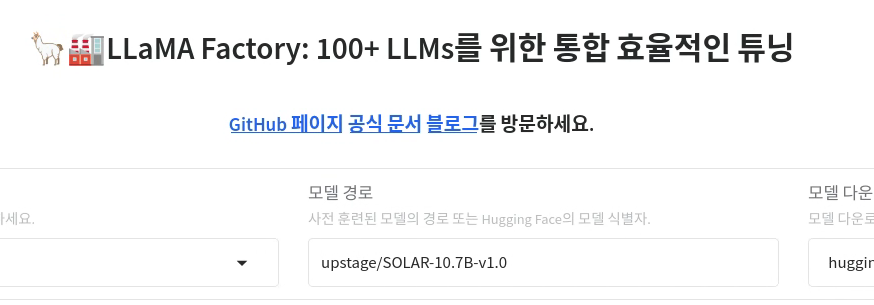
Ubuntu 14에서 설치함
conda create -n llama-factory python=3.11 -y
conda activate llama-factory

conda install pytorch torchvision torchaudio pytorch-cuda=12.4 -c pytorch -c nvidia
pip install llamafactory
llamafactory-cli webui --host 0.0.0.0 --port 7860

conda install -c conda-forge libiomp
llamafactory-cli webui --host 0.0.0.0 --port 7860

LD_PRELOAD=$CONDA_PREFIX/lib/libiomp5.so
export LD_LIBRARY_PATH=$CONDA_PREFIX/lib:$LD_LIBRARY_PATH
llamafactory-cli webui --host 0.0.0.0 --port 7860

python -c "import torch; print(torch.__version__)"
conda list | grep iomp
conda list | grep ittnotify
conda install -c conda-forge libiomp
conda install -c conda-forge libgomp
llamafactory-cli webui --host 0.0.0.0 --port 7860

export LD_LIBRARY_PATH=/opt/intel/oneapi/ittnotify/lib:$LD_LIBRARY_PATH
llamafactory-cli webui --host 0.0.0.0 --port 7860

python -c "import torch; print(torch.__version__); print(torch.__config__.show())"
sudo apt-get update
sudo apt-get install intel-oneapi-ittnotify
wget https://registrationcenter-download.intel.com/akdlm/irc_nas/18315/l_BaseKit_p_2024.2.0.642_offline.sh
sudo bash l_BaseKit_p_2024.2.0.642_offline.sh

pip uninstall torch
pip install torch==2.1.0 --index-url https://download.pytorch.org/whl/cpu
pip install --upgrade torch --index-url https://download.pytorch.org/whl/cpu
llamafactory-cli webui --host 0.0.0.0 --port 7860

pip install --upgrade torch torchvision --index-url https://download.pytorch.org/whl/cpu
llamafactory-cli webui --host 0.0.0.0 --port 7860

pip uninstall torch torchaudio torchvision
pip install torch==2.4.0 torchvision==0.19.0 torchaudio==2.4.0
llamafactory-cli webui --host 0.0.0.0 --port 7860

pip install bitsandbytes>=0.39.0
llamafactory-cli webui --host 0.0.0.0 --port 7860
webui에서 FT 성공 했을 때 "명령어 미리보기" 결과
llamafactory-cli train \
    --stage sft \
    --do_train True \
    --model_name_or_path upstage/SOLAR-10.7B-v1.0 \
    --preprocessing_num_workers 16 \
    --finetuning_type lora \
    --template default \
    --flash_attn auto \
    --dataset_dir data \
    --dataset insurance_sales_alpaca \
    --cutoff_len 1024 \
    --learning_rate 5e-05 \
    --num_train_epochs 3.0 \
    --max_samples 100000 \
    --per_device_train_batch_size 1 \
    --gradient_accumulation_steps 8 \
    --lr_scheduler_type cosine \
    --max_grad_norm 1.0 \
    --logging_steps 5 \
    --save_steps 100 \
    --warmup_steps 0 \
    --packing False \
    --enable_thinking True \
    --report_to none \
    --output_dir saves/SOLAR-10.7B-v1.0/lora/train_2026-03-01-19-03-09 \
    --bf16 True \
    --plot_loss True \
    --trust_remote_code True \
    --ddp_timeout 180000000 \
    --include_num_input_tokens_seen True \
    --optim adamw_torch \
    --quantization_bit 4 \
    --quantization_method bnb \
    --double_quantization True \
    --lora_rank 8 \
    --lora_alpha 16 \
    --lora_dropout 0 \
--lora_target all'IT > AI.ML' 카테고리의 다른 글
| [AI] LLamaFactory 설치 @Windows (0) | 2026.03.13 |
|---|---|
| [AI] Hailo 8L @Windows 11 (0) | 2026.03.12 |
| [AI] ComfyUI 4/2 @Windows11 (0) | 2025.10.02 |
| [AI] ComfyUI 3/2 @Windows11 (0) | 2025.10.02 |
| [AI] ComfyUI 2/2 @Windows11 (0) | 2025.09.30 |
'IT/AI.ML' Related Articles
more


